
The tiny sticker version of Terry.
Baby Terry is the first FaceTiny character — a playful example of what happens when an ordinary profile photo becomes a tiny sticker personality. Download the pack. Send it to your friends. See which reaction becomes your favourite.
Every sticker is cropped, resized and compressed so it drops straight into WhatsApp. Grab one pack or both.

















baby-terry-series-1-whatsapp-stickers.zip
— KB
baby-terry-series-2-whatsapp-stickers.zip
— KB
Two ZIPs, two packs. Each one includes its own 96 × 96 tray icon — add one, or add both.
Series 1 and Series 2 download as separate ZIPs. Every sticker is exactly 512 × 512 with a transparent background.
Both packs include the 96 × 96 tray_icon.png that WhatsApp asks for when you create the pack.
Quality is tuned down automatically until every sticker fits WhatsApp's size budget.
WhatsApp can't install a folder of stickers on its own — a free sticker-maker app does that last step. Pick your phone below and follow along.
NO APP NEEDED
Use WhatsApp's own built-in "Create sticker" button
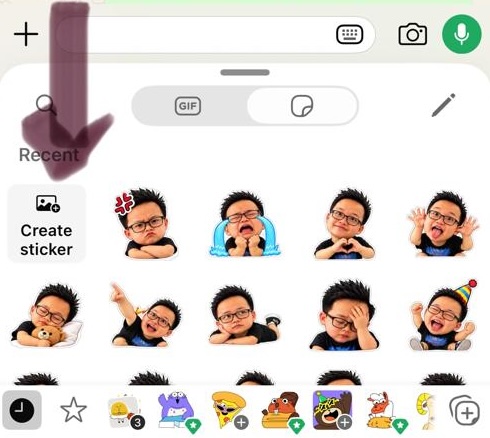
Open any chat, tap the sticker icon, and if you see a + Create sticker tile in your Recents (like the screenshot below), you can skip the app entirely: tap it, pick one unzipped image at a time to turn it into a sticker, and repeat for each of the 9. Tap the ⭐ on the finished pack to add it to Favourites for quick access.
iPhone · iOS
Sticker Maker Studio on the App StoreDownload and unzip
Tap Download Series 1. Open the ZIP in the Files app and tap it once — iOS unzips it into a folder.
Keep the files handy
Inside you'll find 9 .webp stickers plus tray_icon.png. Leave them in Files, or save them to Photos.
Create a new pack
Open Sticker Maker Studio, tap Create a new stickerpack and name it Baby Terry.
Import the 9 stickers
Tap each empty slot, choose Files or Photos, and add one sticker per slot. Set tray_icon.png as the pack's tray image.
Tap Add to WhatsApp
Confirm the prompt, then open any chat → sticker icon → your Baby Terry pack is waiting.
🔁 Then do it all again with the Series 2 ZIP — it installs as a second, separate pack.
Android
Sticker Maker on Google PlayDownload and unzip
Tap Download Series 1. Open Files → Downloads, long-press the ZIP and choose Extract.
Open Sticker Maker
Install it from Google Play, then tap Create a new sticker pack.
Name the pack
Call it Baby Terry and pick tray_icon.png from the extracted folder as the pack icon.
Import the 9 stickers
Tap each slot → Gallery or Files → select the .webp files from the folder you extracted.
Tap Add to WhatsApp
Allow the permission prompt. Open a chat → sticker tab → send your first Baby Terry.
🔁 Then do it all again with the Series 2 ZIP — it installs as a second, separate pack.
Sticker packs can't be added from WhatsApp Web or Desktop. Do it once on your phone — your chats pick them up everywhere.
Every file is 512 × 512 WebP with a transparent background and under 100 KB. Nothing to resize, crop or convert.
Each ZIP ships its own 96 × 96 tray_icon.png. Set it as the pack icon so Baby Terry looks right in the sticker tray.
Series 1 and Series 2 install separately, so you can add one now and the other whenever you want.
One photo. Your baby version. 36 reactions.